

Workspace
Registration, members and their roles, the overview a person lands on, and the two languages ReleaseFlow keeps apart: the one a person reads the interface in, and the one it writes in.
Registration
Open /register to create an Organization and its first account, which is an
administrator. REST clients call POST /api/registrations with
{"organizationName", "displayName", "email", "password", "outputLanguage"} after
fetching a CSRF token (see REST API); outputLanguage is
optional and defaults to English. An email address belongs to one account across the
whole deployment, so registering it twice returns 409 email_already_registered.
Registration also seeds the Organization's category catalog,
its four preset audiences, and its public changelog
address.
A password has at least 12 characters and at most 72 UTF-8 bytes, the most BCrypt reads, and is stored only as a BCrypt hash. The same rule applies when an invitation is accepted.
Registration stays open. Anybody who can reach /register or
POST /api/registrations can create another Organization on your deployment, and no
setting closes it. Each Organization is isolated from the others, but a deployment that
the internet can reach — which webhooks need — should refuse both paths at its reverse
proxy once your own Organization exists. See
Deploying to production.
Members and invitations
An Organization has two roles. Administrators open Members to invite teammates by email, and they alone can:
- connect sources, set their access tokens, and start history imports;
- add sensitive paths to a Project;
- manage the category catalog and decide what the AI proposes;
- manage audiences and choose the release note languages;
- change the output language and the public changelog address;
- write and run automation rules.
Members do the rest of the work: they create Projects, review changes, request AI classification, decide possible duplicates, and prepare, approve, and publish releases. They can read a Project's sources, imports, and sensitive paths, the category catalog, and the release note languages, but not the Members, Audiences, or Automation pages.
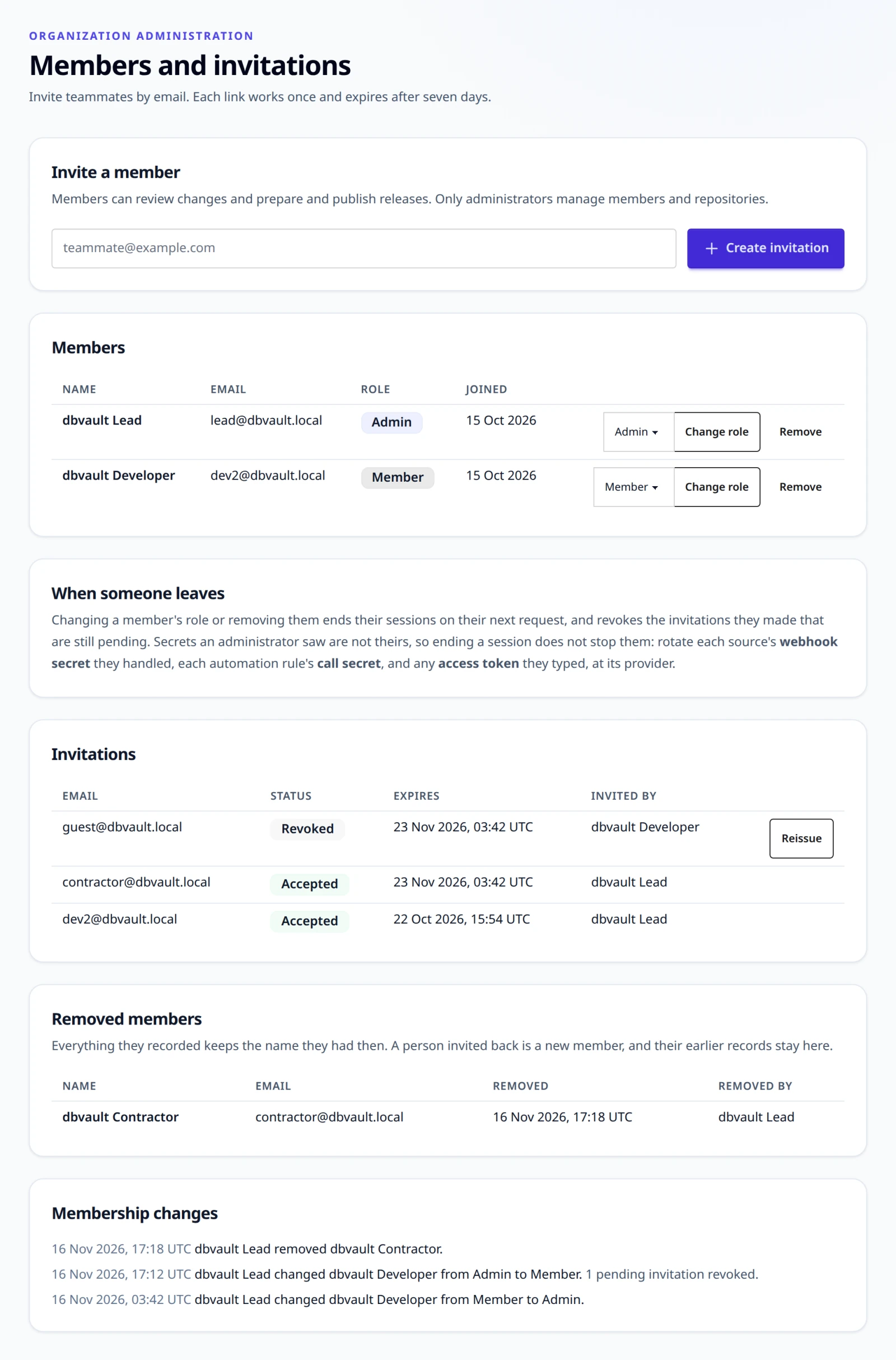
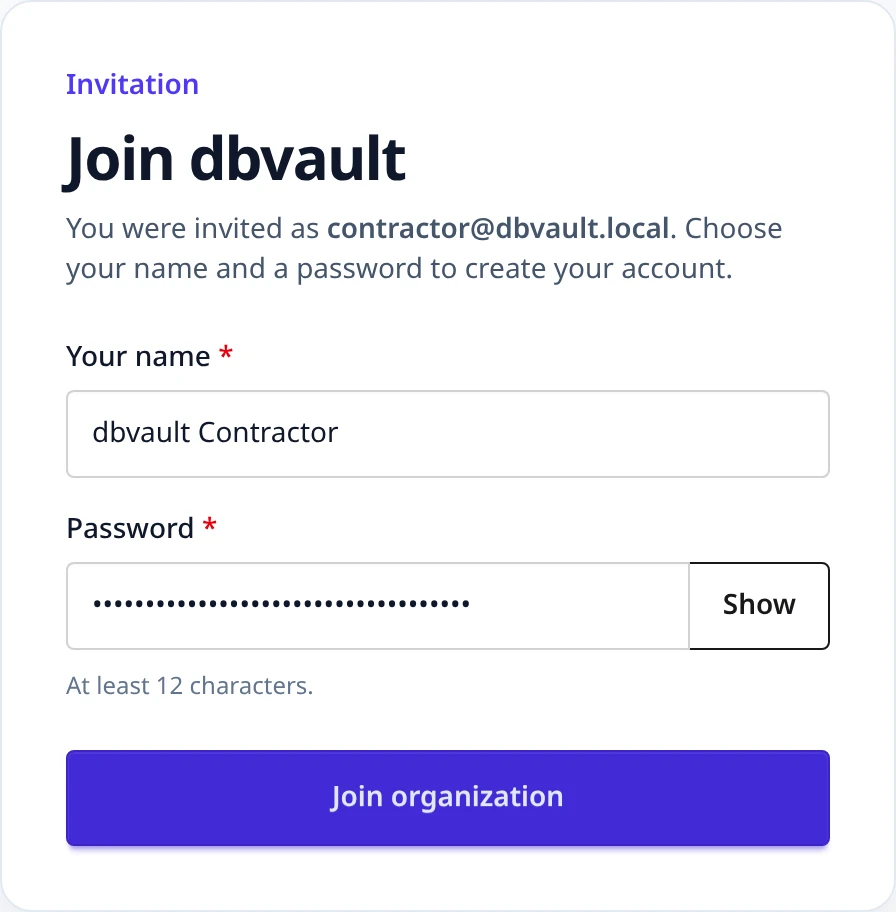
An invitation link has the form /accept-invite#token=… and is shown once.
ReleaseFlow stores only a hash of it. The link expires after seven days (set
RELEASEFLOW_INVITATION_TTL, for example P3D, to change this), works once,
and can be reissued or revoked from the Members page. The invitee confirms the
organization, chooses a name and a password, and signs in as a member.
Change a role or remove a member
An administrator changes a member's role, or removes a member, from the member's row on
the Members page: Change role with the role beside it, or Remove, which asks
first. An administrator may change or remove themselves too, as long as another
administrator remains: an Organization always keeps an administrator, and the last
one is refused with 409 member_last_administrator, even when two administrators try at
the same moment.
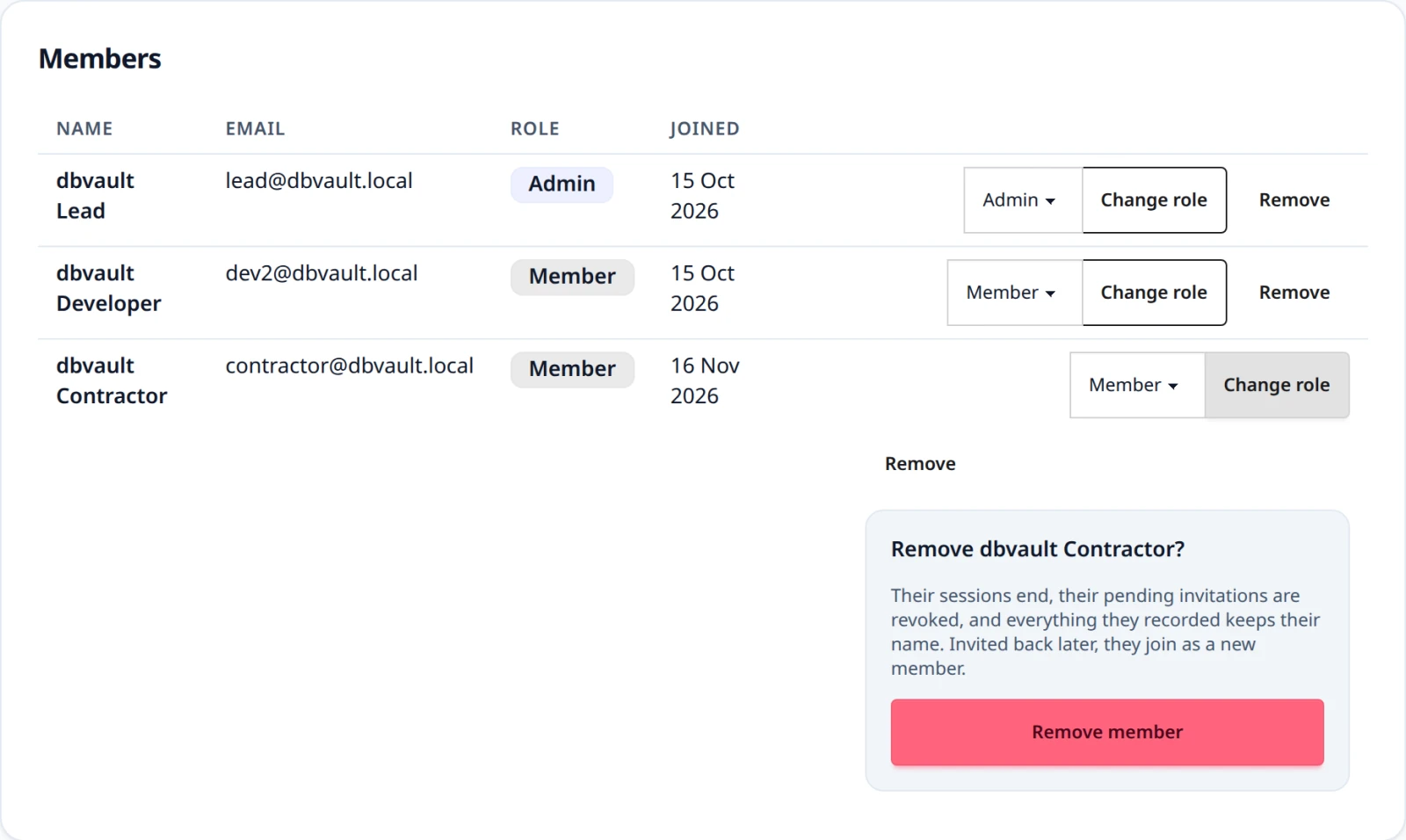
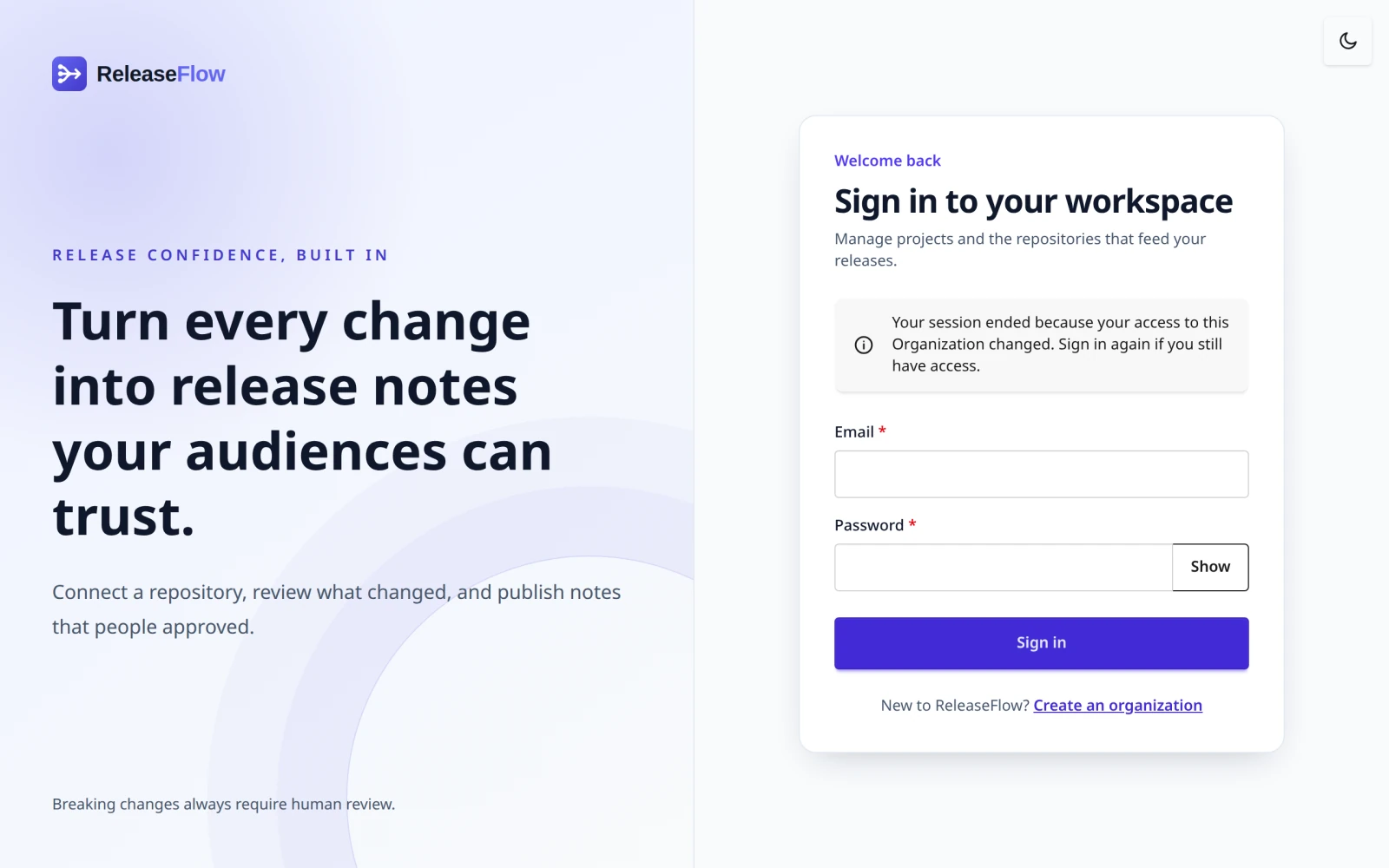
- Their sessions stop on their next request, in every browser and through the API. A demoted or promoted member signs in again and gets the new role; a removed member cannot sign in at all. A page they open then explains that their access changed.
- Their pending invitations are revoked when they are removed, and when an administrator is demoted, because only administrators invite. The history says how many.
- What they recorded keeps their name: reviews, approvals, publications, note edits, exclusions, accepted statuses at review, fold decisions, and the rest show the name they had when they did it.
- A removed person invited back is a new member. Their address is free again, so an administrator can invite it, or the person can join or register another Organization. Accepting creates a new member with a new name; everything they did before stays with the removed member, under the name recorded then.
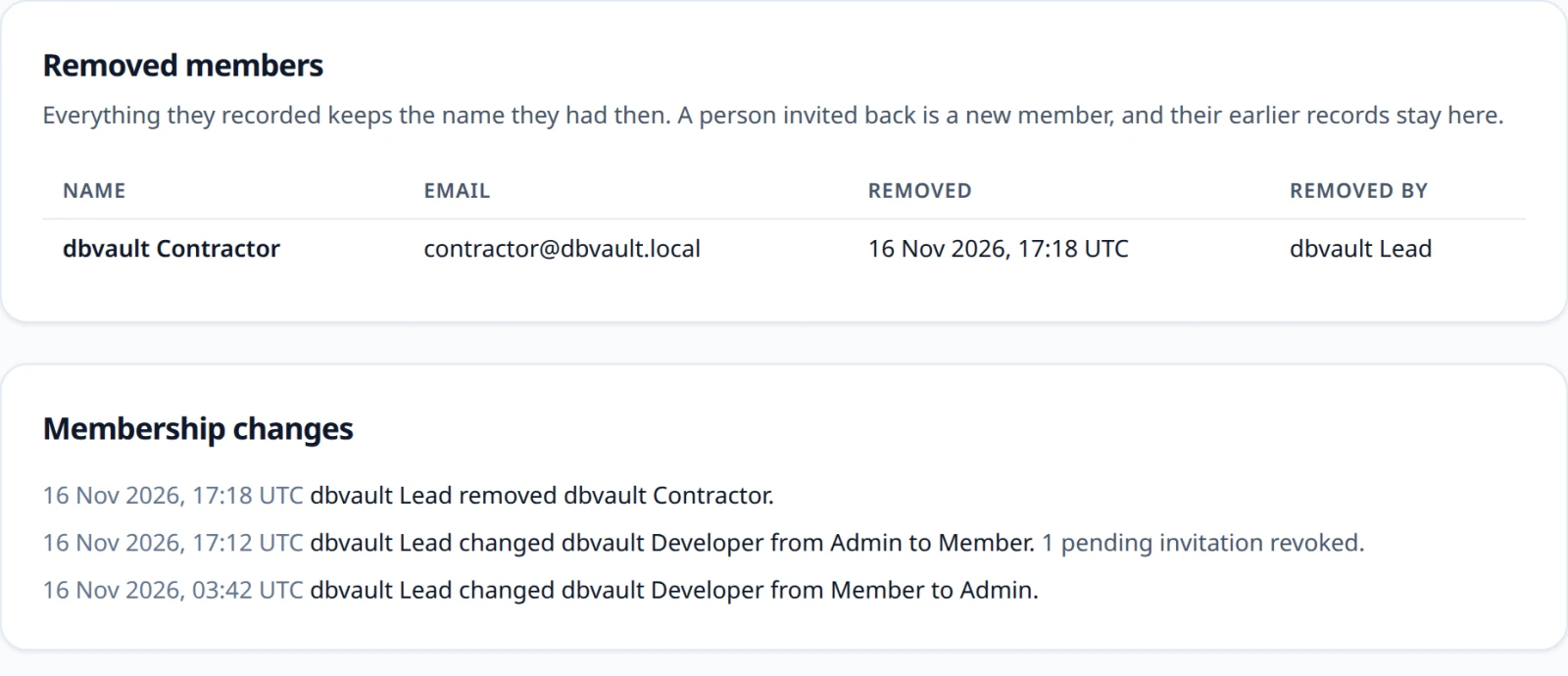
- Who changed what, and when, is listed under Membership changes, and removed people under Removed members, each with who removed them.
When someone leaves
Removing a member, or demoting an administrator, revokes nothing they saw. It ends their sessions and their pending invitations, but a secret is not the person's: it proves a source or a rule, and keeps working for whoever still holds it. For an administrator who leaves, rotate:
- each source's webhook secret they handled: generate or paste a new one, and give it to the provider (Rotate a webhook secret);
- each source's access token they set: save a new one under the source, which the provider confirms first (Access tokens);
- each automation rule's call secret they saw: Rotate secret on the Automation page, which keeps the rule's path and stops the old secret at once (A rule another system calls);
- any provider token they made, such as a GitHub, GitLab, Linear, or Jira token or a Slack, Notion, or Teams credential behind an action: revoke it at the provider, because ReleaseFlow cannot.
ReleaseFlow shows a secret once and keeps no record of who looked, so it cannot say which of these a person saw.

REST clients use the same rules:
GET    /api/members                         (administrator)
PUT    /api/members/{id}/role {"role"}      (administrator; ADMIN or MEMBER)
DELETE /api/members/{id}                    (administrator; 204)
GET    /api/members/changes                 (administrator; newest first)
GET    /api/invitations                     (administrator)
POST   /api/invitations {"email"}           (administrator; 201, returns acceptancePath once)
POST   /api/invitations/{id}/reissue        (administrator)
DELETE /api/invitations/{id}                (administrator)
POST   /api/public/invitations/inspect {"token"}
POST   /api/public/invitations/accept  {"token", "displayName", "password"}
The public endpoints need a CSRF token from GET /api/csrf. Every unusable
token returns 400 invitation_invalid. Other errors are 409 invitation_already_pending, 409 invitation_email_unavailable (the email
already belongs to a member who is not removed), 404 invitation_not_found,
404 member_not_found (an unknown, removed, or other Organization's member),
409 member_last_administrator, and 403 access_denied for members calling
administrator endpoints. A session refused because its member changed answers
401 authentication_required, like any request without a session. See
ADR-0043.
Workspace overview
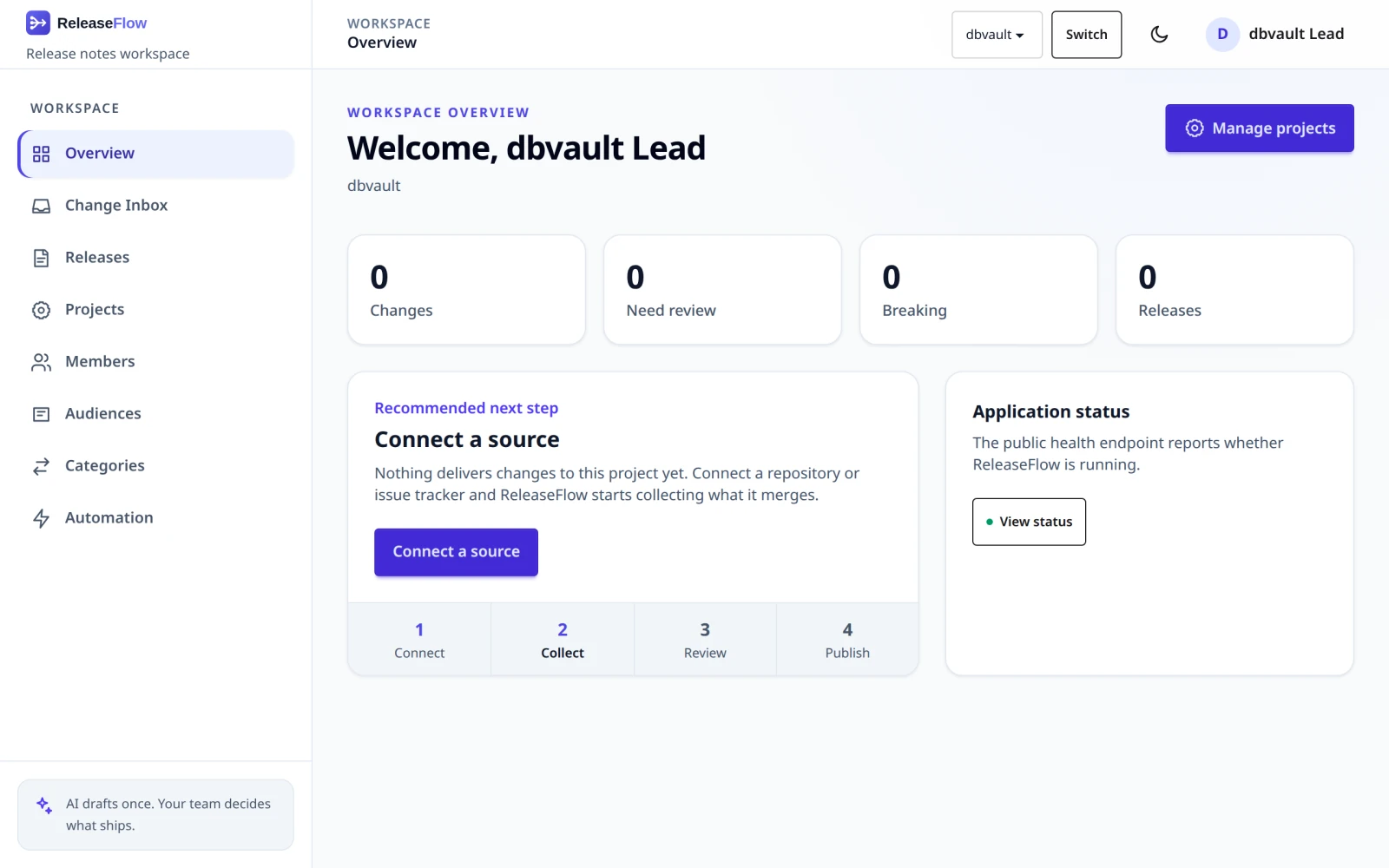
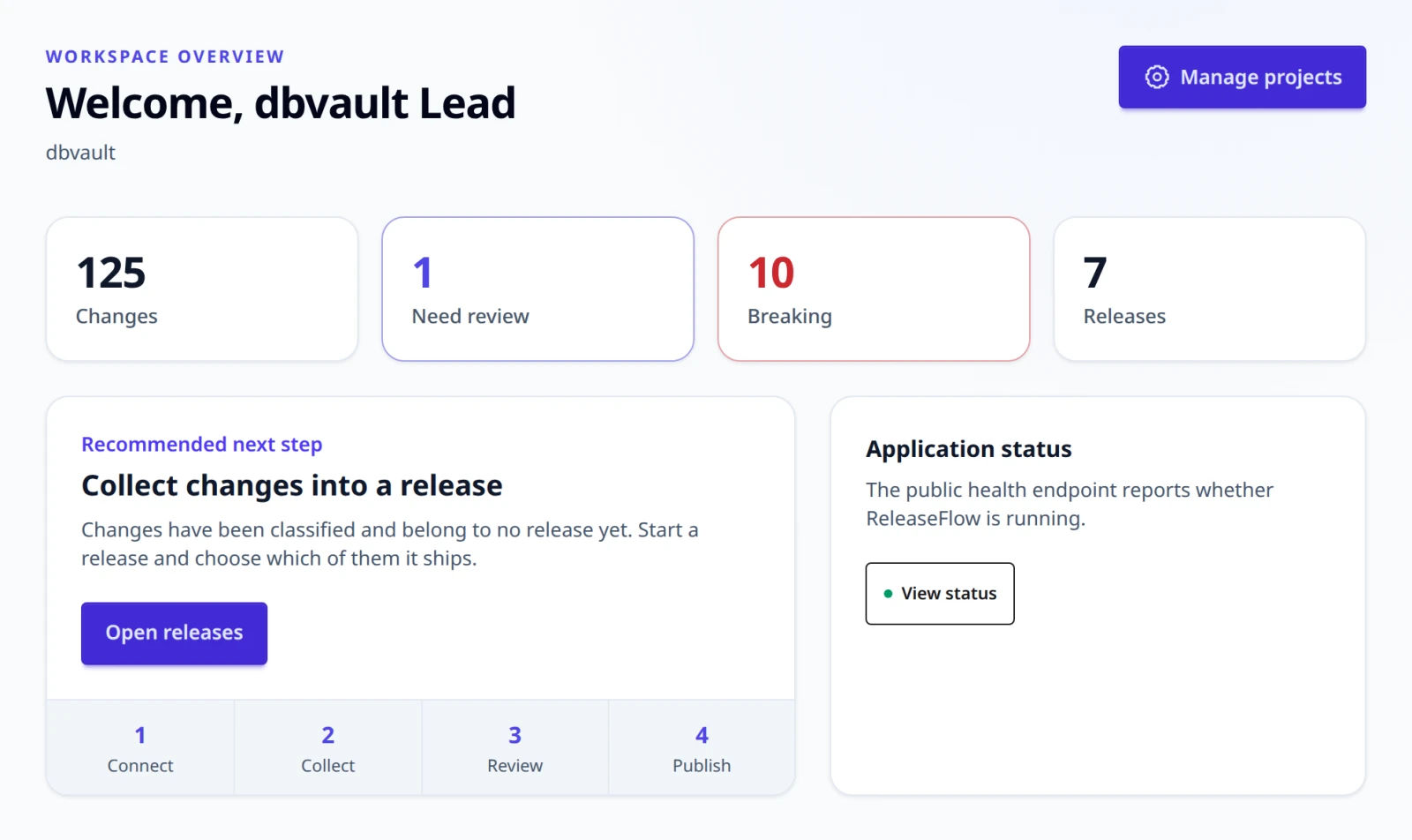
Signing in opens an overview of one Project: how many changes it has, how many need review, how many are breaking, and how many releases it has — each a link to the page that can act on it. Beside them is the one next step that is unfinished, in a fixed order: create a project, connect a source, wait for the first change, collect changes into a release, finish a review, publish an approved release, continue a draft, or nothing waiting. A workspace with an open draft and no changes at all is still waiting for its first change, because there is nothing to put in the draft. A disconnected source does not count as connected.
Beside the figures, the overview lists the Project's sources with their health: each one's last delivery or last read, deliveries refused for their signature, and whether it is quiet, overdue, or disconnected. It is information, never a step, so it changes nothing about which step is offered.
The header and mobile navigation switch between Projects. ReleaseFlow remembers the
last one in the releaseflow_project cookie, so a page reached without ?project=
opens on it rather than on whichever Project happens to be first. A resource URL's
projectId wins over a query and the query wins over the cookie. Switching from a
change or release page keeps that capability; switching from a release detail opens the
selected Project's release list, and switching from an Organization administration page
opens the selected Project's overview. The cookie is HttpOnly and carries no
authority: the Project is still looked up against your Organization, so a query or
cookie naming somebody else's is ignored or refused by the page that owns the request.
The mobile navigation is a keyboard-operated disclosure: focus moves into it when it
opens, Escape closes it, and focus returns to its trigger. Server validation associates
each field error with its control and focuses the first invalid field. Disclosures and
controls keep a 44 px touch target; operations that cancel work, invalidate a secret, or
archive a rule show their effect before the final submit.
ReleaseFlow's full wordmark follows the selected light or dark interface theme on the workspace and account pages. Public changelog headers keep the compact mark beside the Organization name so the Organization remains the primary identity.
A mistyped address answers a browser with a page rather than raw JSON, and one
your role does not reach says so without showing any of it. A form sent after its
session ended returns you to sign in, and one older than your latest sign-in is called
out of date; neither saved anything. A REST client, and anything under /api, keeps
the application/problem+json it had. An address that names something your
Organization does not have — a Project, a release, a rule — answers with the not-found
page and a line saying what was missing.
What a saved form did is said once, after the redirect, in a toast you dismiss
yourself; reloading the page does not say it again. Messages come in four kinds —
success, info, warning, and error — each with its own colour and icon. The browser
never stops a form with a bubble of its own: the server checks every field, writes
each error under the field it is about in your language, and, on a form of more than
one field, sums them up above it. A required field is marked with *.
Interface language
Each person reads ReleaseFlow in English or Vietnamese. The language is picked per request, in this order:
- a
?lang=query parameter on a GET, such as/login?lang=vi; - the
releaseflow_langcookie; - the language saved on the account (
app_users.ui_locale); Accept-Language, narrowed from a region to a language, sovi-VNasks forvi;- the first entry of
RELEASEFLOW_UI_LANGUAGES(defaulten,vi).
A step that names a language this deployment does not ship falls through to the
next one. A supported ?lang= is written to the cookie, so a link can open
ReleaseFlow in a language and the pages after it stay in it; the account's choice
is left alone, and an unsupported value changes nothing. On a public changelog
page, which is cached publicly, ?lang= changes that page only and sets no
cookie. The picker sits in the user menu; choosing a language saves it on the
account and writes the cookie, which outranks the account, so the change shows at
once. The cookie is HttpOnly, lasts a year, and is Secure when the request
was.
The account step reads the account as it is now, so a choice made in another
browser, or through the API, reaches every session of that person on its next
request, unless that session's own cookie or a ?lang= says otherwise.
GET /api/me/ui-locale                  (any member)
PUT /api/me/ui-locale {"uiLocale"}     (the same member)
Both return {uiLocale, supported}. uiLocale is null when the browser decides,
which is also what a new account does and what sending null returns to. A
language this deployment does not ship returns 400 ui_locale_invalid.
Public changelog pages follow the same order, minus the account step: reading a
changelog still creates no session. They declare Vary: Accept-Language, Cookie,
because the note inside them is the same for everybody and the chrome is not. The
RSS feed is one shared document and stays English.
Page copy, form messages, and the title and detail of every
application/problem+json response are written in this language. The code of
an error never changes, so a caller matching on it is unaffected. Recorded
evidence is not interface text and stays as it was recorded: a stored AI failure,
a classification reason, and a provider's own name read the same in every
language.
This is not the language of anything ReleaseFlow writes. Release notes and AI summaries follow the Organization's output language and its release note languages, below, whichever language the person approving them was reading in.
Output language
Each Organization writes its AI summaries in one output language, a language
tag such as en, vi, or pt-BR. It is chosen at registration
(outputLanguage, English by default) and shown on the Projects page, where
administrators can change it. Changes affect only changes classified
afterwards.

GET /api/organization/output-language                     (any member)
PUT /api/organization/output-language {"outputLanguage"}  (administrator)
Both return {outputLanguage, displayName, supported}. Tags are canonicalized
(vi_VN becomes vi-VN); any tag whose language is an ISO 639 code is
accepted, and an invalid one returns 400 output_language_invalid.
RELEASEFLOW_OUTPUT_LANGUAGES (default en,vi) lists the suggestions offered
in the forms.